git clone https://github.com/jewes/gchisto.git
cd gchisto
set JAVA_HOME=d:\pierre\Java\jdk1.7.0_79
d:\apps\apache-maven-3.3.3\bin\mvn clean install
cd target
java -jar gchisto-1.0.1-SNAPSHOT.jar
beware that it requires also the jars in the lib folder - they are included in the MANIFEST.MF file...
I have run the tool on some PROD gc.... I was quite pleased with the result, you get almost all the information you need to assess how bad the situation is - of course you will never know WHAT caused your trouble, but you know when and how much CPU and wait time you are paying for Minor GC and Full GC.
Showing posts with label gc. Show all posts
Showing posts with label gc. Show all posts
Sunday, September 20, 2015


Tuesday, February 10, 2015
Garbage Collection Resources
If you are confronted with a JVM crash in PROD, you might want first to read some documents on GC.
http://www.oracle.com/technetwork/java/javase/gc-tuning-6-140523.html for Java 6, very well explained conceptually.
http://www.fasterj.com/articles/oraclecollectors1.shtml brillant lookup of the main flags available, and possible combination of GC for yound and old generation (Java 7)
http://www.oracle.com/technetwork/java/javase/tech/vmoptions-jsp-140102.html list of all JDK 7 options.
To test the options, you can run InfiniteLoop.java :
and run jconsole....in the "threads" tab you have a nice summary of the Eden Space, Survivor Space, Old Gen.
you can also run jinfo:
where 3797 is the process PID.
Attempts to change GC strategy runtime :
jinfo -flag +UseSerialGC 3797
will miserably fail:
On a different topic, read also:
1 - http://www.oracle.com/technetwork/java/javase/crashes-137240.html this document about troubleshooting system crashes
2 - http://www.oracle.com/technetwork/java/hotspotfaq-138619.html this interesting FAQ list
3 - this document http://www.oracle.com/technetwork/java/jdk50-ts-guide-149808.pdf (a bit outdated) about jmap, jinfo, jstack etc
4 - http://www.oracle.com/technetwork/java/javase/index-137495.html this one repeats more or less - with more details - the info in the above document n. 3
Priceless are these commands:
http://www.oracle.com/technetwork/java/javase/gc-tuning-6-140523.html for Java 6, very well explained conceptually.
http://www.fasterj.com/articles/oraclecollectors1.shtml brillant lookup of the main flags available, and possible combination of GC for yound and old generation (Java 7)
http://www.oracle.com/technetwork/java/javase/tech/vmoptions-jsp-140102.html list of all JDK 7 options.
To test the options, you can run InfiniteLoop.java :
public class InfiniteLoop {
    public static void main(String[] args) throws Exception {
        for (;;) {Thread.sleep(1000);}
    }
}
and run jconsole....in the "threads" tab you have a nice summary of the Eden Space, Survivor Space, Old Gen.
you can also run jinfo:
jinfo -flag UseParallelGC 3797
jinfo -flag MinHeapFreeRatio 3797
jinfo -flag UseSerialGC 3797
where 3797 is the process PID.
Attempts to change GC strategy runtime :
jinfo -flag +UseSerialGC 3797
will miserably fail:
Exception in thread "main" java.io.IOException: Command failed in target VM
 at sun.tools.attach.BsdVirtualMachine.execute(BsdVirtualMachine.java:208)
 at sun.tools.attach.HotSpotVirtualMachine.executeCommand(HotSpotVirtualMachine.java:217)
 at sun.tools.attach.HotSpotVirtualMachine.setFlag(HotSpotVirtualMachine.java:190)
 at sun.tools.jinfo.JInfo.flag(JInfo.java:129)
 at sun.tools.jinfo.JInfo.main(JInfo.java:76)
On a different topic, read also:
1 - http://www.oracle.com/technetwork/java/javase/crashes-137240.html this document about troubleshooting system crashes
2 - http://www.oracle.com/technetwork/java/hotspotfaq-138619.html this interesting FAQ list
3 - this document http://www.oracle.com/technetwork/java/jdk50-ts-guide-149808.pdf (a bit outdated) about jmap, jinfo, jstack etc
4 - http://www.oracle.com/technetwork/java/javase/index-137495.html this one repeats more or less - with more details - the info in the above document n. 3
Priceless are these commands:
jmap -heap 3843
jmap -histo 3843
jmap -permstat 3843
jmap -dump:file=dump.map 3843
jhat -port 7401 dump.map (at this point open your browser at localhost:7401)

jstat -gc 3843
jstat -printcompilation 3843

jstat -gcutil 3843 250 7
Sunday, January 26, 2014
How to demo Garbage Collection, JConsole and VisualVM
First, create with JDK 7 this Java Project in Eclipse:
Then, install the VisualVM GC plugin. Run the GCTestMain main, using these JVM arguments: -verbose:gc -Xms256m -Xmx256m. THen connect with JConsole and with VisualVM (I downloaded the one from the main website.... beware that there can be issues on connection when running on Windows when the username has uppercase characters (Windows sucks, don't forget).
package com.pierre.gctests;

import java.lang.management.ManagementFactory;

import javax.management.InstanceAlreadyExistsException;
import javax.management.MBeanRegistrationException;
import javax.management.MBeanServer;
import javax.management.MalformedObjectNameException;
import javax.management.NotCompliantMBeanException;
import javax.management.ObjectName;

public class GCTestMain {

 private static void init() throws MalformedObjectNameException, InstanceAlreadyExistsException, MBeanRegistrationException, NotCompliantMBeanException {
  MBeanServer mbs = null;
  mbs = ManagementFactory.getPlatformMBeanServer();
  GCTestAgent agent = new GCTestAgent();
  ObjectName agentName;
  agentName = new ObjectName("PVTests:name=GCTestAgent");
  mbs.registerMBean(agent, agentName);
 }

 public static void main(String[] args) throws Exception {
  init();
  for (;;) {
   Thread.sleep(1000);
  }
 }
}
package com.pierre.gctests;

public interface GCTestAgentMBean {
 void newThread(String threadName);
 void newCollectableObject(int size);
 void newLeakedObject(int size);
 void clearLeaked();
 void cpuIntensiveOperation(int iterations);
}
package com.pierre.gctests;

import java.util.ArrayList;
import java.util.Date;

public class GCTestAgent implements GCTestAgentMBean, Runnable {
 ArrayList<Object> leakingMap = new ArrayList<Object>();
 volatile double val = 10;

 @Override
 public void newThread(String threadName) {
  Thread newThread = new Thread(this);
  newThread.setName(threadName);
  newThread.start();
 }

 @Override
 public void newCollectableObject(int size) {
  createObject(size);
 }

 private Object createObject(int size) {
  ArrayList<String> list = new ArrayList<String>();
  for (int i = 0; i < size; i++) {
   list.add( (new Date()).toString() + " " +  i);
  }
  return list;
 }

 @Override
 public void newLeakedObject(int size) {
  leakingMap.add(createObject(size));
 }

 @Override
 public void run() {
  for (;;) {
   System.out.println(Thread.currentThread().getName());
   try {
    Thread.sleep(10000);
   } catch (InterruptedException e) {
    e.printStackTrace();
   }
  }
 }

 @Override
 public void clearLeaked() {
  leakingMap.clear();
 }

 @Override
 public void cpuIntensiveOperation(int iterations) {
  int[] myArrayToBeSorted = new int[] {4,2,6,7,2,1,6};
  for (int i = 0; i < iterations; i++) {
   for (int j = 0; j < myArrayToBeSorted.length - 1; j++) {
    myArrayToBeSorted[j] = myArrayToBeSorted[j] + myArrayToBeSorted[j + 1];
   }
  }
 }

}
Then, install the VisualVM GC plugin. Run the GCTestMain main, using these JVM arguments: -verbose:gc -Xms256m -Xmx256m. THen connect with JConsole and with VisualVM (I downloaded the one from the main website.... beware that there can be issues on connection when running on Windows when the username has uppercase characters (Windows sucks, don't forget).
Tuesday, January 21, 2014
Garbage Collection: testing the GC plugin for VisualVM
Watch the excellent tutorial
Install VisualVm GC plugin (I had to download it locally to install it, I could not install directly...) (beware, you should use visualvm for java 7, otherwise the plugin installation will fail)
I run this test code:
I run it with Java 7 and I get this:
Install VisualVm GC plugin (I had to download it locally to install it, I could not install directly...) (beware, you should use visualvm for java 7, otherwise the plugin installation will fail)
I run this test code:
package com.pierre.gctests;

import java.util.ArrayList;

public class PVOOM {
 public static void main(String[] args) throws InterruptedException {
  ArrayList al = new ArrayList();
  for (int i = 0; i < 1000000; i++) {
   for (int j = 0; j< 1000; j++) {
    al.add(new Animal(Integer.toString(i)));
   }
   Thread.sleep(1);

  }
 }
}

class Animal {
 public Animal(String name) {
  super();
  this.name = name;
 }

 String name;

}
I run it with Java 7 and I get this:
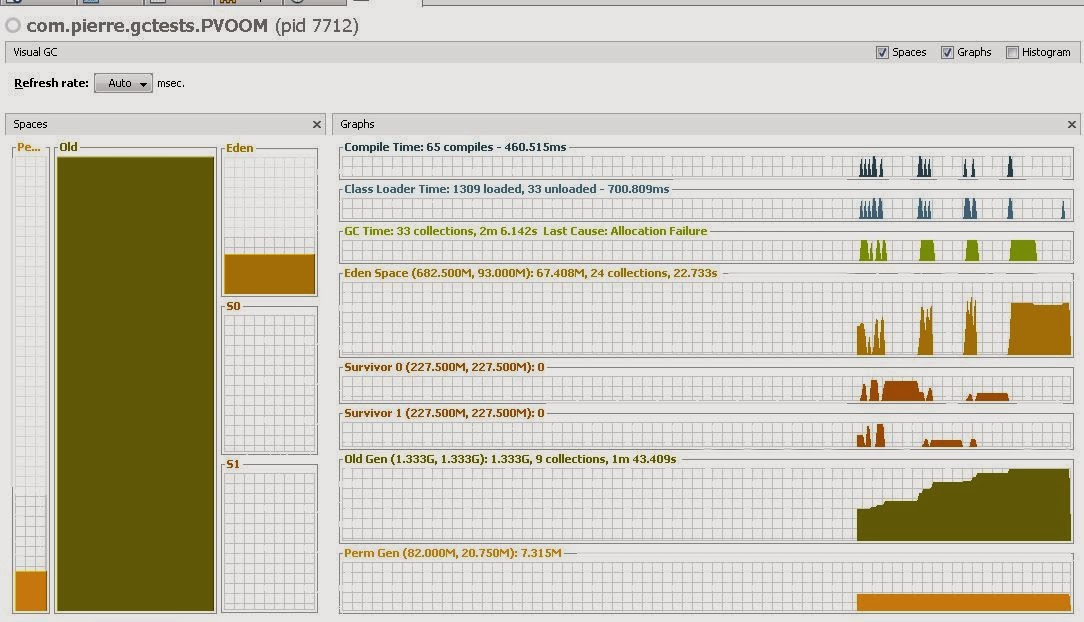
Wednesday, October 5, 2011
GC overhead limit exceeded
http://stackoverflow.com/questions/4371505/gc-overhead-limit-exceeded
parameters which influence this message:
GCTimeLimit
GCHeapFreeLimit
-XX:-UseGCOverheadLimit to switch control off
Anyway rather than trying to hide the problem, I would rather try to fix the bloody code.
parameters which influence this message:
GCTimeLimit
GCHeapFreeLimit
-XX:-UseGCOverheadLimit to switch control off
Anyway rather than trying to hide the problem, I would rather try to fix the bloody code.
Subscribe to:
Posts (Atom)
