Showing posts with label jmc. Show all posts

Sunday, July 30, 2017

Java Flight Recorder JFR: enable recording of exceptions

how to specify custom settings for JFR

http://isuru-perera.blogspot.it/2016/03/specifying-custom-event-settings-file.html

The default settings are in C:\Program Files\Java\jre1.8.0_121\lib\jfr\default.jfc (in Windows... otherwise in JAVA_HOME/jre/lib/jfr/default.jfc in Linux.

so you can enable also the "Exceptions" event, just copy the default.jfc to /tmp/default.jfc, hack it

<event path="java/exception_throw">
      <setting name="enabled" control="http://www.oracle.com/hotspot/jvm/enable-exceptions">false</setting>
      <setting name="stackTrace">true</setting>
    </event>


set it to true

and start the jfr with

jcmd JFR.start settings=/tmp/default.jfc

and you will smile and be happy


Saturday, December 17, 2016

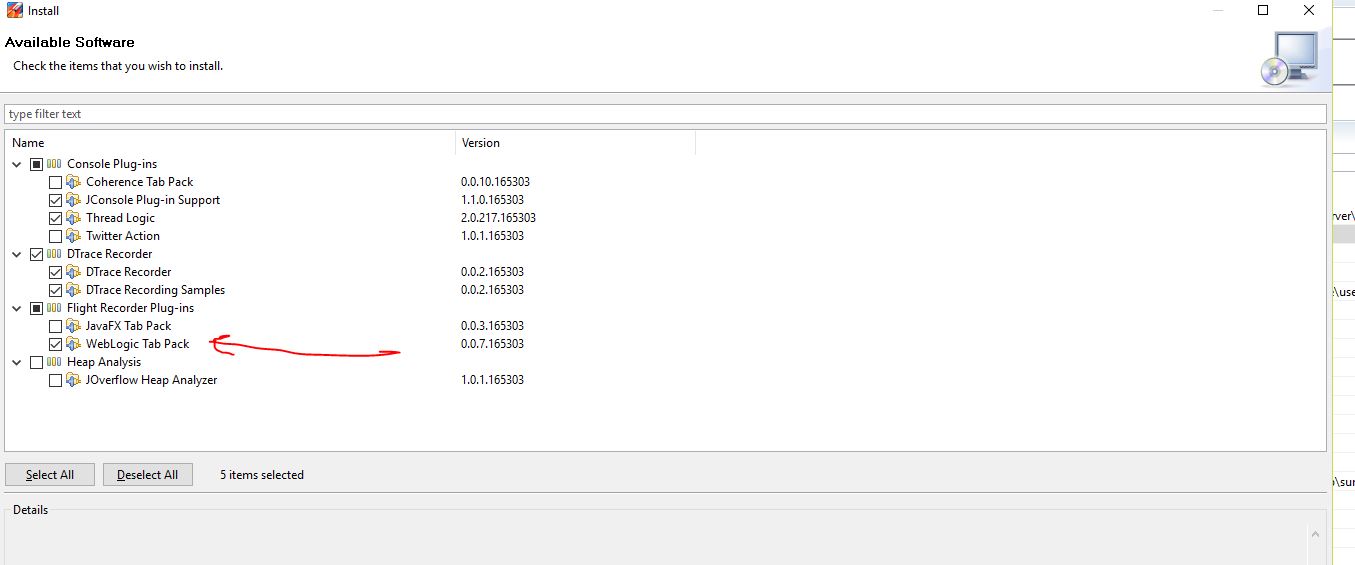
Java Mission Control jmc WebLogic plugin

funnily, the plugin installs, but whenever I run it, it says "event type BLA is not enabled in this recording" and I can't figure out how to enable the event recording...

https://docs.oracle.com/javacomponents/jmc-5-5/jmc-user-guide/experimental.htm#JMCCI131
https://blogs.oracle.com/WebLogicServer/entry/weblogic_tip
this video is about the JRockit version:

To install: run jmc.exe, Help, Install new Software


If you see this when activating Commercial Features via JMC:

[jfr][WARN ][3932.289] Unable to register PDH query for "\Process(java#0)\% Processor Tim"
[jfr][WARN ][3932.290] Please check the registry if this performance object/counter is disabled
[jfr][WARN ][3932.290] Unable to register PDH query for "\Process(java#0)\% Privileged Tim"
[jfr][WARN ][3932.290] Please check the registry if this performance object/counter is disabled
[jfr][WARN ][3932.290] Unable to register PDH query for "\Process(java#1)\% Processor Tim"
[jfr][WARN ][3932.290] Please check the registry if this performance object/counter is disabled
[jfr][WARN ][3932.290] Unable to register PDH query for "\Process(java#1)\% Privileged Tim"
[jfr][WARN ][3932.290] Please check the registry if this performance object/counter is disabled
[jfr][WARN ][3932.293] Unable to register PDH query for "\System\Context Switches/se"
[jfr][WARN ][3932.293] Please check the registry if this performance object/counter is disabled


it seems to be a known bug (Windows only)


Friday, December 11, 2015

Java Mission Control JMC video training

Very good overall coverage of JMC features


Sunday, November 8, 2015

JMC: how to capture details of caught and unlogged exceptions

It happens occasionally that inexperienced programmers catch an exception and ignore it, or they catch it and throw another exception without reporting the full details of the root cause.

This situation turns naturally in an operational nightmare.

But Java Mission Control can really help you out. Let´s run this code (remember the -XX:+UnlockCommercialFeatures -XX:+FlightRecorder ) :
public class ThrowsException {
 public static void main(String[] args) {
  while (true) {
   try {
    Thread.sleep(1000);
    throw new Exception("ciao bella gioia");
   }
   catch (Throwable t) {
   }
  }
 }
}


I run the JMC flight recorder, then go to the Code/Exceptions tab and this is what I get:


Saturday, November 7, 2015

Java Mission Control JMC with Java 7 u79

jmc is installed OOTB with this jmc.ini file:

-startup
../lib/missioncontrol/plugins/org.eclipse.equinox.launcher_1.3.0.v20140415-2008.jar
--launcher.library
../lib/missioncontrol/plugins/org.eclipse.equinox.launcher.win32.win32.x86_64_1.1.200.v20141007-2033
--launcher.appendVmargs
-vm
../jre/bin/
-vmargs
-XX:+UseG1GC
-XX:+UnlockCommercialFeatures
-XX:+FlightRecorder
-XX:FlightRecorderOptions=defaultrecording=true
-Djava.net.preferIPv4Stack=true


unfortunately it doesn't discover my local JVM (run with a JDK java!)

I get this error message:


"no local (attachable) JVM were detected". The JMC help says:
Why does Java Mission Control fail to find any local JVMs?
Consider the following:

•Make sure that you are using JAVA_HOME/bin/jmc to start the JMC client.


•If you are running JMC from Eclipse, make sure that Eclipse is running on a JDK (not JRE).


•Make sure that there is a directory named hsperfdata_username in the system's tmp directory, that it is writable by the user running JMC, and that the file system supports access control lists (ACLs).


First in the jmc.ini file I change ../jre/bin/ into C:\pierre\Java\jdk1.7.0_79\bin, then I select the C:\temp\hsperfdata_pierre folder and make it R/W (it was readonly!) and give full control to everyone. This time around all works fine. So sad that I don't get a better error message from JMC.... it would have been so simple just to display me a stacktrace or something more detailed. Even running "jmc -debug" didn't help...

If zou forget to run your program under test with the JMC options "-XX:+UnlockCommercialFeatures -XX:+FlightRecorder", you get this message:

Flight Recorder features are not enabled. To enable this you need to use a Java 7u4 or later JVM started with -XX:+UnlockCommercialFeatures -XX:+FlightRecorder.


Saturday, September 12, 2015

Java Mission Control, the Swiss Knife of Monitoring

I have extensively used JRockit Mission Control and really missed when I moved to Sun-JVM projects.... now that we use WebLogic 12 we have Java 1.7 (> u40) and so we can use Java Mission Control (JMC), which is exactly like the JRockit version..... with its fantastic Flight Recorder...

Awesome presentation here ( a bit blabla in the first few minutes.... just be patient...)


Here the code used in the example:
package com.pierre;

public class DeadlockGenerator {
    private static class AllocThread extends Thread {
 public void run() {
     while (true) {
  Thread.yield();
  try {
      sleep(20 * 1000);
  } catch (Exception e) {

  }
  for (int i = 0; i < 40000; i++) {
      char[] tmp = new char[1024 * 1024];
      tmp[1] = 'a';
  }
     }
 }
    }

    private static class LockerThread extends Thread {
 Object l1;
 Object l2;

 public void init(Object lock1, Object lock2) {
     l1 = lock1;
     l2 = lock2;
 }

 public void run() {
     while (true) {
  synchronized (l1) {
      try {
   Thread.sleep(1000);
      } catch (InterruptedException e) {
      }
      ;
  }
  synchronized (l2) {
      try {
   Thread.sleep(1000);
      } catch (InterruptedException e) {
      }
      ;
  }
  System.out.println("Got one!");
     }
 }
    }

    public static void main(String[] args) {
 AllocThread allocThread = new AllocThread();
 Object lock1 = new Object();
 Object lock2 = new Object();
 LockerThread first = new LockerThread();
 LockerThread second = new LockerThread();
 first.init(lock1, lock2);
 second.init(lock2, lock1);
 allocThread.start();
 first.start();
 second.start();

    }
}


This video is much shorter and at the end it shows how to solve locking issues