Showing posts with label oracledb. Show all posts
Showing posts with label oracledb. Show all posts
Sunday, June 21, 2020
Oracle monitoring session
https://orahow.com/find-long-running-queries-in-oracle/
http://www.dba-oracle.com/t_find_long_running_sql_queries.htm
WITH blocked_resources AS (select id1 ,id2 ,SUM(ctime) as blocked_secs ,COUNT(1) as blocked_count ,type from v$lock where request > 0 group by type,id1,id2 ) ,blockers AS (select L.id1, L.id2, L.type, L.sid ,BR.blocked_secs ,BR.blocked_count from v$lock L ,blocked_resources BR where BR.type = L.type and BR.id1 = L.id1 and BR.id2 = L.id2 and L.lmode > 0 and L.block <> 0 ) select /*+ MERGE(@"SEL$22") MERGE(@"SEL$109DB78D") MERGE(@"SEL$5") MERGE(@"SEL$38") MERGE(@"SEL$470E2127") MERGE(@"SEL$7286615E") MERGE(@"SEL$62725911") MERGE(@"SEL$2EC965E0") MERGE(@"SEL$C8360722") MERGE(@"SEL$874CA85A") MERGE(@"SEL$74A24351") MERGE(@"SEL$71D7A081") MERGE(@"SEL$7") MERGE(@"SEL$24") CARDINALITY(@"SEL$AF73C875" "S"@"SEL$4" 1000) CARDINALITY(@"SEL$AF73C875" "R"@"SEL$4" 1000) */ B.id1||'_'||B.id2||'_'||S.sid||'_'||S.serial# as id ,'SID,SERIAL:'||S.sid||','||S.serial#||',LOCK_TYPE:'||B.type||',PROGRAM:'||S.program||',MODULE:'||S.module||',ACTION:'||S.action||',MACHINE:'||S.machine||',OSUSER:'||S.osuser||',USERNAME:'||S.username as info ,B.blocked_secs ,B.blocked_count from v$session S ,blockers B where B.sid = S.sid;
Recommended the use of TOAD for DBA (Database browser)


Saturday, November 16, 2019
rats, in OracleXE DB a create user no longer works unless....
create user PIPPO IDENTIFIED BY PIPPO
googling around I find that you must preceed the commmand with:
alter session set "_ORACLE_SCRIPT"=true;
create user PIPPO IDENTIFIED BY PIPPO;
grant create session to PIPPO;
GRANT CONNECT, RESOURCE, CREATE VIEW TO PIPPO;
GRANT ALL PRIVILEGES to PIPPO;
create table USERS (id NUMBER GENERATED BY DEFAULT AS IDENTITY, name varchar(100) );
This is simply ridiculous.
Fehlerbericht -
ORA-65096: Ungültiger allgemeiner Benutzer- oder Rollenname
65096. 00000 -  "invalid common user or role name"
*Cause:    An attempt was made to create a common user or role with a name
           that was not valid for common users or roles.  In addition to
           the usual rules for user and role names, common user and role
           names must start with C## or c## and consist only of ASCII
           characters.
*Action:   Specify a valid common user or role name.
googling around I find that you must preceed the commmand with:
alter session set "_ORACLE_SCRIPT"=true;
create user PIPPO IDENTIFIED BY PIPPO;
grant create session to PIPPO;
GRANT CONNECT, RESOURCE, CREATE VIEW TO PIPPO;
GRANT ALL PRIVILEGES to PIPPO;
create table USERS (id NUMBER GENERATED BY DEFAULT AS IDENTITY, name varchar(100) );
This is simply ridiculous.
Tuesday, August 14, 2018
Oracle DB Invalid Objects
Some usefuls commands to troubleshoot:
select count(*) from USER_OBJECTS where OBJECT_TYPE = 'TABLE';
select count(*) from user_objects where object_type='TYPE';
select count(*) from user_tables;
select * from USER_OBJECTS where STATUS = 'INVALID';
exec dbms_utility.compile_schema( 'MYUSER' );
alter package MYPACKAGE COMPILE;
alter package MYPACKAGE COMPILE BODY;
show errors;
select * from user_errors ;
References:
https://oracle-base.com/articles/misc/recompiling-invalid-schema-objects
https://asktom.oracle.com/pls/asktom/f?p=100:11:0::::P11_QUESTION_ID:637156098168
select count(*) from USER_OBJECTS where OBJECT_TYPE = 'TABLE';
select count(*) from user_objects where object_type='TYPE';
select count(*) from user_tables;
select * from USER_OBJECTS where STATUS = 'INVALID';
exec dbms_utility.compile_schema( 'MYUSER' );
alter package MYPACKAGE COMPILE;
alter package MYPACKAGE COMPILE BODY;
show errors;
select * from user_errors ;
References:
https://oracle-base.com/articles/misc/recompiling-invalid-schema-objects
https://asktom.oracle.com/pls/asktom/f?p=100:11:0::::P11_QUESTION_ID:637156098168
Saturday, June 10, 2017
Oracle Database Certification
OCA Associate (1Z0-061 and 1Z0-052)
OCP Professional
OCM Master
RAC Real Application Clusters
Database Control process
Oracle Enterprise Manager Grid Control
OCI (Oracle Call Interface)
Data Definition Language (DDL)
Data Control Language (DCL)
Transaction Control Language (TCL)
database = physical files on disk
instance = background processes
shared memory segments = system global area, or SGA . Contains: database buffer cache, log buffer, shared pool.
nonshareable memory = program global area, or PGA, private to the session
database buffer cache : to execute SQL.
log buffer (circular buffer) : contains change vectors before they are written to redo log
log writer background process, the LGWR, writes log buffer to disk (commit).
data dictionary cache = tables descriptions etc
library cache = executed parsed code
PL/SQL Area = part of the shared pool, in data dictionary
SQL Query and PL/SQL Function Result Cache
to retrieve tables definitions:
SELECT table_name FROM user_tables;
change vector, redo log
data guard: physical standby and logical standby
is part of RAC DB?
select parallel from v$instance;
has standby DB?
select protection_level from v$database;
Streams configured?
select * from dba_streams_administrator;
display memory settings for different areas (shared pool, large pool, java pool):
select COMPONENT,CURRENT_SIZE,MIN_SIZE,MAX_SIZE from v$sga_dynamic_components;
display PGA memory allocation:
select name,value from v$pgastat;
Notable processes:
System Monitor (SMON), Process Monitor (PMON), Database Writer (DBWn), Log Writer (LGWR), Checkpoint Process (CKPT), Manageability Monitor (MMON), Memory Manager (MMAN), Archiver (ARCn), Recoverer (RECO)
SMON mounts a DB
DBWn writes Database Buffer Cache to DB files
LGWR writes Log Buffers to disk
CKPT flushes dirty buffers
MMON monitors performance and statistics, launches the ADDM Automatic Database Diagnostic Monitor
MMAN Memory Manager
ARCn Archiver
to show all processes: select * from v$process;
Files:
controlfile (pointers to DB files, integrity checksums ),
the online redo log files,
and the datafiles
datafiles consist in blocks, segments, extents (=group of blocks)
SYSTEM and SYSAUX are 2 default tablespaces, they contain the METADATA (data dictionary)
USER_TABLES ALL_TABLES DBA_TABLES
dba_extents :
select DISTINCT TABLESPACE_NAME from dba_extents; -> SYSAUX UNDOTBS1 USERS SYSTEM
v$datafile : select * from v$datafile; gives you all the DBF files who make the DB
select * from dba_tablespaces; TABLESPACE_NAME are SYSTEM SYSAUX UNDOTBS1 TEMP USERS DEV_IAS_TEMP DEV_STB
OCP Professional
OCM Master
RAC Real Application Clusters
Database Control process
Oracle Enterprise Manager Grid Control
OCI (Oracle Call Interface)
Data Definition Language (DDL)
Data Control Language (DCL)
Transaction Control Language (TCL)
database = physical files on disk
instance = background processes
shared memory segments = system global area, or SGA . Contains: database buffer cache, log buffer, shared pool.
nonshareable memory = program global area, or PGA, private to the session
database buffer cache : to execute SQL.
log buffer (circular buffer) : contains change vectors before they are written to redo log
log writer background process, the LGWR, writes log buffer to disk (commit).
data dictionary cache = tables descriptions etc
library cache = executed parsed code
PL/SQL Area = part of the shared pool, in data dictionary
SQL Query and PL/SQL Function Result Cache
to retrieve tables definitions:
SELECT table_name FROM user_tables;
change vector, redo log
data guard: physical standby and logical standby
is part of RAC DB?
select parallel from v$instance;
has standby DB?
select protection_level from v$database;
Streams configured?
select * from dba_streams_administrator;
display memory settings for different areas (shared pool, large pool, java pool):
select COMPONENT,CURRENT_SIZE,MIN_SIZE,MAX_SIZE from v$sga_dynamic_components;
display PGA memory allocation:
select name,value from v$pgastat;
Notable processes:
System Monitor (SMON), Process Monitor (PMON), Database Writer (DBWn), Log Writer (LGWR), Checkpoint Process (CKPT), Manageability Monitor (MMON), Memory Manager (MMAN), Archiver (ARCn), Recoverer (RECO)
SMON mounts a DB
DBWn writes Database Buffer Cache to DB files
LGWR writes Log Buffers to disk
CKPT flushes dirty buffers
MMON monitors performance and statistics, launches the ADDM Automatic Database Diagnostic Monitor
MMAN Memory Manager
ARCn Archiver
to show all processes: select * from v$process;
Files:
controlfile (pointers to DB files, integrity checksums ),
the online redo log files,
and the datafiles
datafiles consist in blocks, segments, extents (=group of blocks)
SYSTEM and SYSAUX are 2 default tablespaces, they contain the METADATA (data dictionary)
USER_TABLES ALL_TABLES DBA_TABLES
dba_extents :
select DISTINCT TABLESPACE_NAME from dba_extents; -> SYSAUX UNDOTBS1 USERS SYSTEM
v$datafile : select * from v$datafile; gives you all the DBF files who make the DB
select * from dba_tablespaces; TABLESPACE_NAME are SYSTEM SYSAUX UNDOTBS1 TEMP USERS DEV_IAS_TEMP DEV_STB
Thursday, November 6, 2014
Java: what is your default timezone?
cat MyTimezone.java
javac MyTimezone.java
java MyTimezone
on one machine I have:
The second machine has timezone "Europe/Vaduz", and the Oracle DB doesn't recognize it:
This explains why your JVM might get in trouble with the Oracle DB and you have to set explicitly the timezone yourself...
See also http://www.javamonamour.org/2014/11/ora-01882-timezone-region-not-found.html
Funnily:
these 2 files are identical.
How does Java determine its default timezone from the Linux machine it's running on?
on RHEL, use redhat-config-date system-config-time timeconfig tzselect
import java.util.TimeZone;

public class  MyTimezone {
    public static void main(String[] args) throws Exception {
        TimeZone timeZone = TimeZone.getDefault();
        System.out.println(timeZone);
    }
}
javac MyTimezone.java
java MyTimezone
on one machine I have:
sun.util.calendar.ZoneInfo[id="Europe/Zurich",offset=3600000,dstSavings=3600000,useDaylight=true,
transitions=119,lastRule=java.util.SimpleTimeZone[id=Europe/Zurich,offset=3600000,dstSavings=3600000,
useDaylight=true,startYear=0,startMode=2,startMonth=2,startDay=-1,startDayOfWeek=1,startTime=3600000,startTimeMode=2,endMode=2,
endMonth=9,endDay=-1,endDayOfWeek=1,endTime=3600000,endTimeMode=2]]
on another machine I have:
sun.util.calendar.ZoneInfo[id="Europe/Vaduz",offset=3600000,dstSavings=3600000,useDaylight=true,
transitions=119,lastRule=java.util.SimpleTimeZone[id=Europe/Vaduz,offset=3600000,dstSavings=3600000,
useDaylight=true,startYear=0,startMode=2,startMonth=2,startDay=-1,startDayOfWeek=1,startTime=3600000,startTimeMode=2,endMode=2,
endMonth=9,endDay=-1,endDayOfWeek=1,endTime=3600000,endTimeMode=2]]
The second machine has timezone "Europe/Vaduz", and the Oracle DB doesn't recognize it:
SELECT * FROM V$TIMEZONE_NAMES where TZNAME = 'Europe/Vaduz';nothing!
This explains why your JVM might get in trouble with the Oracle DB and you have to set explicitly the timezone yourself...
See also http://www.javamonamour.org/2014/11/ora-01882-timezone-region-not-found.html
Funnily:
diff /usr/share/zoneinfo/Europe/Vaduz /etc/localtime

diff /usr/share/zoneinfo/Europe/Zurich /etc/localtime
these 2 files are identical.
How does Java determine its default timezone from the Linux machine it's running on?
on RHEL, use redhat-config-date system-config-time timeconfig tzselect
Wednesday, November 5, 2014
ORA-01882: timezone region not found
After applying package update on Linux RHEL, we get on all Datasources:
ORA-01882: timezone region not found
First let's determine on which timezone our server is:
grep "ZONE=" /etc/sysconfig/clock
ZONE="Europe/Zurich"
let's open a connection to our DB and check:
SELECT * FROM V$TIMEZONE_NAMES where TZNAME = 'Europe/Zurich';
Europe/Zurich LMT
Europe/Zurich BMT
Europe/Zurich CET
Europe/Zurich CEST
I think CET is pretty decent...
I can fix the issue in 2 ways:
either I do "export TZ=CET" in my "soa" Linux user profile (.bashrc)
or I set the property in DOMAIN_HOME/bin/setDomainEnv.sh
-Duser.timezone=CET
Either will work.
Small test harness:
cat DBPing.java
javac DBPing.java
java -cp /opt/oracle/fmw11_1_1_5/wlserver_10.3/server/lib/ojdbc6.jar:. DBPing acme ********** jdbc:oracle:thin:@mydb.acme.com:1551/s_gr00
second edition:
by setting the timezone we fix the error...
Setting "oracle.jdbc.timezoneAsRegion=false" in the WebLogic Datasource properties also does the job. This probably is the least impact solution, as it affects only the DB...
ORA-01882: timezone region not found
First let's determine on which timezone our server is:
grep "ZONE=" /etc/sysconfig/clock
ZONE="Europe/Zurich"
let's open a connection to our DB and check:
SELECT * FROM V$TIMEZONE_NAMES where TZNAME = 'Europe/Zurich';
Europe/Zurich LMT
Europe/Zurich BMT
Europe/Zurich CET
Europe/Zurich CEST
I think CET is pretty decent...
I can fix the issue in 2 ways:
either I do "export TZ=CET" in my "soa" Linux user profile (.bashrc)
or I set the property in DOMAIN_HOME/bin/setDomainEnv.sh
-Duser.timezone=CET
Either will work.
Small test harness:
cat DBPing.java
import java.sql.DriverManager;
import java.sql.SQLException;

public class DBPing {
        public static void main(String[] args) throws ClassNotFoundException, SQLException {
                Class.forName("oracle.jdbc.driver.OracleDriver");
                System.out.println("length " + args.length);
                String user = args[0];
                String password = args[1];
                String url = args[2];
                String now = new java.util.Date().toString();
                System.out.println(now + " user= " + user + " password=" + password + " url=" + url);
                java.sql.Connection conn = DriverManager.getConnection(url, user, password);
                System.out.println("ok");
        }
}
javac DBPing.java
java -cp /opt/oracle/fmw11_1_1_5/wlserver_10.3/server/lib/ojdbc6.jar:. DBPing acme ********** jdbc:oracle:thin:@mydb.acme.com:1551/s_gr00
length 3
Wed Nov 05 15:41:24 CET 2014 user= acme password=bla
url=jdbc:oracle:thin:@mydb.acme.com:1551/s_gr00
Exception in thread "main" java.sql.SQLException: ORA-00604: error occurred at recursive SQL level 1
ORA-01882: timezone region not found

        at oracle.jdbc.driver.T4CTTIoer.processError(T4CTTIoer.java:440)
        at oracle.jdbc.driver.T4CTTIoer.processError(T4CTTIoer.java:389)
        at oracle.jdbc.driver.T4CTTIoer.processError(T4CTTIoer.java:382)
        at oracle.jdbc.driver.T4CTTIfun.processError(T4CTTIfun.java:573)
        at oracle.jdbc.driver.T4CTTIoauthenticate.processError(T4CTTIoauthenticate.java:431)
        at oracle.jdbc.driver.T4CTTIfun.receive(T4CTTIfun.java:445)
        at oracle.jdbc.driver.T4CTTIfun.doRPC(T4CTTIfun.java:191)
        at oracle.jdbc.driver.T4CTTIoauthenticate.doOAUTH(T4CTTIoauthenticate.java:366)
        at oracle.jdbc.driver.T4CTTIoauthenticate.doOAUTH(T4CTTIoauthenticate.java:752)
        at oracle.jdbc.driver.T4CConnection.logon(T4CConnection.java:366)
        at oracle.jdbc.driver.PhysicalConnection.(PhysicalConnection.java:538)
        at oracle.jdbc.driver.T4CConnection.(T4CConnection.java:228)
        at oracle.jdbc.driver.T4CDriverExtension.getConnection(T4CDriverExtension.java:32)
        at oracle.jdbc.driver.OracleDriver.connect(OracleDriver.java:521)
        at java.sql.DriverManager.getConnection(DriverManager.java:582)
        at java.sql.DriverManager.getConnection(DriverManager.java:185)
        at DBPing.main(DBPing.java:13)
second edition:
import java.sql.DriverManager;
import java.sql.SQLException;
import java.util.TimeZone;

public class DBPing {
        public static void main(String[] args) throws ClassNotFoundException, SQLException {
                TimeZone timeZone = TimeZone.getTimeZone("Europe/Zurich");
                TimeZone.setDefault(timeZone);
                Class.forName("oracle.jdbc.driver.OracleDriver");
                System.out.println("length " + args.length);
                String user = args[0];
                String password = args[1];
                String url = args[2];
                String now = new java.util.Date().toString();
                System.out.println(now + " user= " + user + " password=" + password + " url=" + url);
                java.sql.Connection conn = DriverManager.getConnection(url, user, password);
                System.out.println("ok");
        }
}
by setting the timezone we fix the error...
Setting "oracle.jdbc.timezoneAsRegion=false" in the WebLogic Datasource properties also does the job. This probably is the least impact solution, as it affects only the DB...
CONNECTION_PROPERTY_TIMEZONE_AS_REGION

static final java.lang.String CONNECTION_PROPERTY_TIMEZONE_AS_REGION

Use JVM default timezone as specified rather than convert to a GMT offset. Default is true.
Monday, August 11, 2014
Oracle DB check contraints based on regular expression
It's good to know that for "check constraint" you can use any arbitrary regular expression http://docs.oracle.com/cd/E11882_01/server.112/e17118/conditions007.htm#SQLRF52150 .
Example:
If you try inserting some crap you get:
If you get something like this below it means that your regex is bad or that the last parameter of REGEXP_LIKE is not legal (e.g. if you enter it UPPER CASE instead of lower case):
Example:
create table PIPPO (name varchar2 (32));
alter table PIPPO add constraint check_name check (REGEXP_LIKE(name,'bi|bo|ba','c'));
If you try inserting some crap you get:
Error starting at line 5 in command:
INSERT INTO "CMDBUSER"."PIPPO" (NAME) VALUES ('bu')
Error report:
SQL Error: ORA-02290: check constraint (CMDBUSER.CHECK_NAME) violated
02290. 00000 -  "check constraint (%s.%s) violated"
*Cause:    The values being inserted do not satisfy the named check

*Action:   do not insert values that violate the constraint.
If you get something like this below it means that your regex is bad or that the last parameter of REGEXP_LIKE is not legal (e.g. if you enter it UPPER CASE instead of lower case):
INSERT INTO "CMDBUSER"."PIPPO" (NAME) VALUES ('bu')
ORA-01760: illegal argument for function
ORA-06512: at line 1
Tuesday, June 24, 2014
ORA-00932: inconsistent datatypes: expected NUMBER got INTERVAL DAY TO SECOND
It looks like you are trying to do maths (+, -) with TIMESTAMP.
If you try to sum or subtract two timestamps, you will get:
ORA-00932: inconsistent datatypes: expected NUMBER got INTERVAL DAY TO SECOND
TIMESTAMP doesn't like that. you should CAST the TIMESTAMP to DATE:
rather than
bla - blu (where bla and blu are TIMESTAMP)
do
CAST (bla as DATE) - CAST (blu as DATE)
and you will get a NUMBER (multiply it by 3600 * 24 and you will turn it into seconds)
BUT
you will lose the millisecond info
Here you have the definition of the TIMESTAMP
If you try to sum or subtract two timestamps, you will get:
ORA-00932: inconsistent datatypes: expected NUMBER got INTERVAL DAY TO SECOND
TIMESTAMP doesn't like that. you should CAST the TIMESTAMP to DATE:
rather than
bla - blu (where bla and blu are TIMESTAMP)
do
CAST (bla as DATE) - CAST (blu as DATE)
and you will get a NUMBER (multiply it by 3600 * 24 and you will turn it into seconds)
BUT
you will lose the millisecond info
Here you have the definition of the TIMESTAMP
Tuesday, January 7, 2014
Oracle DB: which SQL is being run by a given OS user?
assuming the os user is nnvernetpi:
on RAC, v$session refers only to the current node. gv$session is the whole RAC
(thanks Alain for the explanation)
select * from v$sql where sql_id in (select sql_ID from gv$session where lower(OSUSER) = 'nnvernetpi');
on RAC, v$session refers only to the current node. gv$session is the whole RAC
(thanks Alain for the explanation)
Tuesday, November 12, 2013
Calling an Oracle Stored Procedure in Java or in Python
I needed to schedule the execution of a Stored Procedure from a cron job.... somebody advised me to use a Java class to do that.
It proved to be really cumbersome... I have followed this example and it's working, but it's very verbose and ugly.
Also, in Java there is no built-in support for getopt style of reading CLI parameters, and using the gnu getopt library seemed overkill to me.
So at the end I will keep using good old zxJDBC from a Python (WLST) script, which supports stored procedures in a VERY simple way: http://www.jython.org/archive/21/docs/zxjdbc.html
The only disturbing thing is that the startup time for WLST is a bit long, much longer than for a JVM.... but who cares, really, for a job who has to be called once every 10 minutes...
It proved to be really cumbersome... I have followed this example and it's working, but it's very verbose and ugly.
Also, in Java there is no built-in support for getopt style of reading CLI parameters, and using the gnu getopt library seemed overkill to me.
So at the end I will keep using good old zxJDBC from a Python (WLST) script, which supports stored procedures in a VERY simple way: http://www.jython.org/archive/21/docs/zxjdbc.html
db = zxJDBC.connect(...)
c = db.cursor()
params = [None]
c.callproc("funcout", params)
The only disturbing thing is that the startup time for WLST is a bit long, much longer than for a JVM.... but who cares, really, for a job who has to be called once every 10 minutes...
Thursday, July 18, 2013
Oracle DB, purge large tables
I have a huge table WLI_NESOA2_REPORTING_ARCHIVE and I need to purge 10000 rows at a time for all records older than 2013-05-10. It's easy if you use a ROWID table and empty it progressively.
--evaluate number of rows to delete
select count(*) from WLI_NESOA2_REPORTING_ARCHIVE;
select count(*) from WLI_NESOA2_REPORTING_ARCHIVE where EventOccuredOn < '2013-05-10';

--prepare empty table containing those rowids
drop table tobedeleted;

--populate table
create table tobedeleted  as SELECT rowid as MYROWID from WLI_NESOA2_REPORTING_ARCHIVE where EventOccuredOn < '2013-05-10';

--evaluate if numbers match
select count(*) from tobedeleted;


DECLARE
  nCount  NUMBER;
BEGIN
  nCount := 0;
  LOOP
    --create subset of 10000 to delete
    execute immediate 'create table TOBEDELETEDNOW as select MYROWID from tobedeleted where rownum <= 10000';
    --delete first 10000
    execute immediate 'delete from WLI_NESOA2_REPORTING_ARCHIVE where rowid in (select MYROWID from TOBEDELETEDNOW )';
    commit;
    --remove the already purged records from list
    execute immediate 'delete from tobedeleted where MYROWID in (select MYROWID from TOBEDELETEDNOW)';
    nCount := sql%rowcount;
    execute immediate 'drop table TOBEDELETEDNOW';
    commit;


    DBMS_OUTPUT.PUT_LINE('deleted records: ' || to_char(ncount) );
    commit;

    EXIT WHEN nCount = 0;

  END LOOP;
end;
/
Thursday, June 6, 2013
SchemaCrawler for Oracle DB diff
I want to be able to trace all the modifications to my CMDB, and email the diff report on a regular basis. Lots of tools there but none seems to be a) free b) simple to use. SchemaCrawler doesn't do the diff, but you can export the whole schema and data into a txt file, and do a diff.
Download from http://schemacrawler.sourceforge.net/ and unzip.
Copy C:\Oracle\Middleware\wlserver_10.3\server\ext\jdbc\oracle\11g\ojdbc6_g.jar into the $SC_HOME/lib folder.
This will NOT display data, only structure:
sc -host=dbhost.acme.com -port=1522 -database=mydb.acme.com -user=CMDBTRUNK -infolevel=maximum -password=blablabla -c=details > cmdbtrunk.txt
This will display data (dump):
sc -host=dbhost.acme.com -port=1522 -database=mydb.acme.com -user=CMDBTRUNK -infolevel=maximum -password=blablabla -c=details,dump > cmdbtrunk.txt
This one will dump tables ACME but NOT tables ACME_BLA:
./sc.sh -host=mydb.acme.com -port=1522 -database=mydb.com -user=
Download from http://schemacrawler.sourceforge.net/ and unzip.
Copy C:\Oracle\Middleware\wlserver_10.3\server\ext\jdbc\oracle\11g\ojdbc6_g.jar into the $SC_HOME/lib folder.
This will NOT display data, only structure:
sc -host=dbhost.acme.com -port=1522 -database=mydb.acme.com -user=CMDBTRUNK -infolevel=maximum -password=blablabla -c=details > cmdbtrunk.txt
This will display data (dump):
sc -host=dbhost.acme.com -port=1522 -database=mydb.acme.com -user=CMDBTRUNK -infolevel=maximum -password=blablabla -c=details,dump > cmdbtrunk.txt
This one will dump tables ACME but NOT tables ACME_BLA:
./sc.sh -host=mydb.acme.com -port=1522 -database=mydb.com -user=
Tuesday, May 21, 2013
Oracle DB: Am I a SYSDBA?
given the user INSTALL, here are all the SQL you can try to check if you are a SYSDBA:
select * from session_privs;
select * from user_sys_privs;
select * from dba_role_privs where GRANTEE = 'INSTALL';
select * from dba_sys_privs where GRANTEE = 'INSTALL';
select * from dba_tab_privs where GRANTEE = 'INSTALL';
select dbms_metadata.get_granted_ddl('ROLE_GRANT', 'INSTALL') from dual;
select dbms_metadata.get_granted_ddl('SYSTEM_GRANT', 'INSTALL') from dual;
select dbms_metadata.get_granted_ddl('OBJECT_GRANT', 'INSTALL') from dual;
In my case, the result of "select * from dba_role_privs where GRANTEE = 'INSTALL';" is:
select * from session_privs;
select * from user_sys_privs;
select * from dba_role_privs where GRANTEE = 'INSTALL';
select * from dba_sys_privs where GRANTEE = 'INSTALL';
select * from dba_tab_privs where GRANTEE = 'INSTALL';
select dbms_metadata.get_granted_ddl('ROLE_GRANT', 'INSTALL') from dual;
select dbms_metadata.get_granted_ddl('SYSTEM_GRANT', 'INSTALL') from dual;
select dbms_metadata.get_granted_ddl('OBJECT_GRANT', 'INSTALL') from dual;
In my case, the result of "select * from dba_role_privs where GRANTEE = 'INSTALL';" is:
"GRANTEE" "GRANTED_ROLE" "ADMIN_OPTION" "DEFAULT_ROLE"
"INSTALL" "CONNECT" "NO" "YES"
"INSTALL" "ROLE_DBA_ADMIN" "NO" "YES"
Monday, April 29, 2013
Statement Timeout on a datasource
If your DB takes too long to return data from a JDBC call, you might have STUCK threads.
Using DBMS_LOCK.sleep(seconds => 20); in a stored procedure I have simulated the behaviour of a SLOW DB.
I set a Statement Timeout value of 15 seconds on the Datasource.
(value is in SECONDS, not in MILLISECONDS)
After 15 seconds I get:
In alternative, you might also get a java.sql.SQLTimeoutException: ORA-03111: break received on communication channel
I have also added oracle.net.CONNECT_TIMEOUT=10000 to the Properties of the datasource, and the timeout still occurs at 15 seconds.
I recommend applying also this parameter, useful in case the DB listener is unresponsive.
In fact, setting the Statement Timeout is equivalent to https://docs.oracle.com/javase/7/docs/api/java/sql/Statement.html#setQueryTimeout(int) , which allows you to create only 1 Datasource and programmatically set the timeout on a per-query basis:
"Limiting Statement Processing Time with Statement Timeout With the Statement Timeout option on a JDBC data source, you can limit the amount of time that a statement takes to execute on a database connection reserved from the data source. When you set a value for Statement Timeout, WebLogic Server passes the time specified to the JDBC driver using the java.sql.Statement.setQueryTimeout() method. If your JDBC driver does not support this method, it may throw an exception and the timeout value is ignored. When Statement Timeout is set to -1, (the default) statements do not timeout. See the JDBC Data Source: Configuration: Connection Pool page in the Administration Console or see “ JDBCConnectionPoolParamsBean” in the WebLogic Server MBean Reference for more details about this option.
Using DBMS_LOCK.sleep(seconds => 20); in a stored procedure I have simulated the behaviour of a SLOW DB.
I set a Statement Timeout value of 15 seconds on the Datasource.
value = 15
cd('/JDBCSystemResources/' + dsName + '/JDBCResource/' + dsName + '/JDBCConnectionPoolParams/' + dsName)
cmo.setStatementTimeout(int(value))
(value is in SECONDS, not in MILLISECONDS)
After 15 seconds I get:
java.sql.SQLTimeoutException: ORA-01013: user requested cancel of current operation
ORA-06512: at "SYS.DBMS_LOCK", line 205
ORA-06512: at "DEV1_SOAINFRA.PRC_PROCESS", line 17
ORA-06512: at line 1

 at oracle.jdbc.driver.T4CTTIoer.processError(T4CTTIoer.java:457)
 at oracle.jdbc.driver.T4CTTIoer.processError(T4CTTIoer.java:405)
 at oracle.jdbc.driver.T4C8Oall.processError(T4C8Oall.java:889)
 at oracle.jdbc.driver.T4CTTIfun.receive(T4CTTIfun.java:476)
 at oracle.jdbc.driver.T4CTTIfun.doRPC(T4CTTIfun.java:204)
 at oracle.jdbc.driver.T4C8Oall.doOALL(T4C8Oall.java:540)
 at oracle.jdbc.driver.T4CCallableStatement.doOall8(T4CCallableStatement.java:213)
 at oracle.jdbc.driver.T4CCallableStatement.executeForRows(T4CCallableStatement.java:1075)
 at oracle.jdbc.driver.OracleStatement.doExecuteWithTimeout(OracleStatement.java:1466)
 at oracle.jdbc.driver.OraclePreparedStatement.executeInternal(OraclePreparedStatement.java:3752)
 at oracle.jdbc.driver.OraclePreparedStatement.execute(OraclePreparedStatement.java:3937)
 at oracle.jdbc.driver.OracleCallableStatement.execute(OracleCallableStatement.java:9259)
 at oracle.jdbc.driver.OraclePreparedStatementWrapper.execute(OraclePreparedStatementWrapper.java:1535)
 at weblogic.jdbc.wrapper.PreparedStatement.execute(PreparedStatement.java:99)
 at oracle.tip.adapter.db.sp.AbstractStoredProcedure.execute(AbstractStoredProcedure.java:123)
In alternative, you might also get a java.sql.SQLTimeoutException: ORA-03111: break received on communication channel
I have also added oracle.net.CONNECT_TIMEOUT=10000 to the Properties of the datasource, and the timeout still occurs at 15 seconds.
I recommend applying also this parameter, useful in case the DB listener is unresponsive.
In fact, setting the Statement Timeout is equivalent to https://docs.oracle.com/javase/7/docs/api/java/sql/Statement.html#setQueryTimeout(int) , which allows you to create only 1 Datasource and programmatically set the timeout on a per-query basis:
"Limiting Statement Processing Time with Statement Timeout With the Statement Timeout option on a JDBC data source, you can limit the amount of time that a statement takes to execute on a database connection reserved from the data source. When you set a value for Statement Timeout, WebLogic Server passes the time specified to the JDBC driver using the java.sql.Statement.setQueryTimeout() method. If your JDBC driver does not support this method, it may throw an exception and the timeout value is ignored. When Statement Timeout is set to -1, (the default) statements do not timeout. See the JDBC Data Source: Configuration: Connection Pool page in the Administration Console or see “ JDBCConnectionPoolParamsBean” in the WebLogic Server MBean Reference for more details about this option.
Friday, April 26, 2013
ORA-12705: Cannot access NLS data files or invalid environment specified
I was trying to use TOAD to connect to Oracle DB. Normally I use SQLDeveloper. I understand TOAD is more powerful, but I don't like its UI and I have only the FREE version.
Here it suggests to run regedit and rename NLS_LANG into NLS_LANG_X under any occurrence of the key in HKEY_LOCAL_MACHINE\SOFTWARE\ORACLE. I found several occurrences and replaced them all.
It didn't work.
Then I tried changing the Oracle Installed Client to XE and it worked

See also http://www.dba-oracle.com/t_ora_12705_resolution.htm
All this royally sucks. Meaningless error message without any context information.
Anyway I wanted to run TOAD for the "data compare" diff utility between 2 schemas, but it's available only in the commercial version.
Here it suggests to run regedit and rename NLS_LANG into NLS_LANG_X under any occurrence of the key in HKEY_LOCAL_MACHINE\SOFTWARE\ORACLE. I found several occurrences and replaced them all.
It didn't work.
Then I tried changing the Oracle Installed Client to XE and it worked

See also http://www.dba-oracle.com/t_ora_12705_resolution.htm
All this royally sucks. Meaningless error message without any context information.
Anyway I wanted to run TOAD for the "data compare" diff utility between 2 schemas, but it's available only in the commercial version.
Tuesday, April 23, 2013
Oracle DB schema/data compare tools
http://www.impacttoys.com/screen_shots.htm pretty good but doesn't compare data
This one seems really cool, but quite expensive:
http://www.red-gate.com/products/oracle-development/data-compare-for-oracle/
For free you get this http://dbdiff-for-oracle.en.softonic.com/, but download doesn't work here.
more links here http://stackoverflow.com/questions/510813/is-there-a-tool-to-db-diff-on-data-for-an-oracle-database
This one seems really cool, but quite expensive:
http://www.red-gate.com/products/oracle-development/data-compare-for-oracle/
For free you get this http://dbdiff-for-oracle.en.softonic.com/, but download doesn't work here.
more links here http://stackoverflow.com/questions/510813/is-there-a-tool-to-db-diff-on-data-for-an-oracle-database
Tuesday, March 5, 2013
Triggers in Oracle DB
CREATE TABLE "PVTEST"
( "PVNAME" VARCHAR2(20 BYTE)
) ;


CREATE TABLE "PVLOG"
( "PVSUMMARY" VARCHAR2(20 BYTE)
) ;


CREATE OR REPLACE TRIGGER PVTEST_TRIGGER
  BEFORE DELETE OR INSERT OR UPDATE ON PVTEST
  FOR EACH ROW

BEGIN
  insert into PVLOG (PVSUMMARY) values ('pippo');
END;
With this trigger, and modification will generate an extra entry in the PVLOG table.
Now I want to distinguish the operation being done:
CREATE OR REPLACE TRIGGER PVTEST_TRIGGER
  BEFORE DELETE OR INSERT OR UPDATE ON PVTEST
  FOR EACH ROW

BEGIN
  IF DELETING then
    insert into PVLOG (PVSUMMARY) values ('DELETING');
  END IF;
  IF INSERTING  then
    insert into PVLOG (PVSUMMARY) values ('INSERTING');
  END IF;
  IF UPDATING  then
    insert into PVLOG (PVSUMMARY) values ('UPDATING ');
  END IF;

END;
/
in the case of an UPDATE, you have the 2 variables :OLD and :NEW pointing to the old and new record.
The real pity is that there doesn't seem to be a way to declare a trigger for ANY table in the schema, and retrieving the table being affected with a :TABLE variable. You can define SCHEMA TRIGGERS, but they cannot be defined to catch INSERT DELETE UPDATE events.
Monday, December 24, 2012
Very useful Oracle DB queries
show all tablespaces used in this DB:
select unique TABLESPACE_NAME from DBA_TABLES;
show all indexes on a table:
SELECT i.index_name, ic.column_position, ic.column_name
FROM user_indexes i JOIN user_ind_columns ic
ON i.index_name = ic.index_name
WHERE i.TABLE_NAME = 'MYTABLE';
select * from V$DATABASE,
and
select * from GV$INSTANCE;
tell you a lot about SID, SERVICE_NAME and other properties of your instance.
select unique TABLESPACE_NAME from DBA_TABLES;
show all indexes on a table:
SELECT i.index_name, ic.column_position, ic.column_name
FROM user_indexes i JOIN user_ind_columns ic
ON i.index_name = ic.index_name
WHERE i.TABLE_NAME = 'MYTABLE';
select * from V$DATABASE,
and
select * from GV$INSTANCE;
tell you a lot about SID, SERVICE_NAME and other properties of your instance.
Wednesday, December 19, 2012
Oracle Client installation on Windows
Download the client here:
http://www.oracle.com/technetwork/database/enterprise-edition/downloads/112010-win32soft-098987.html
The file is win32_11gR2_client.zip.
I run install the setup ad Administrator - otherwise it fails to assess the prerequisites - and I specify as installation directory C:\pierre\oradb\product\11.2.0\client_1
I also do custom installation and choose "Oracle Database Utilities"
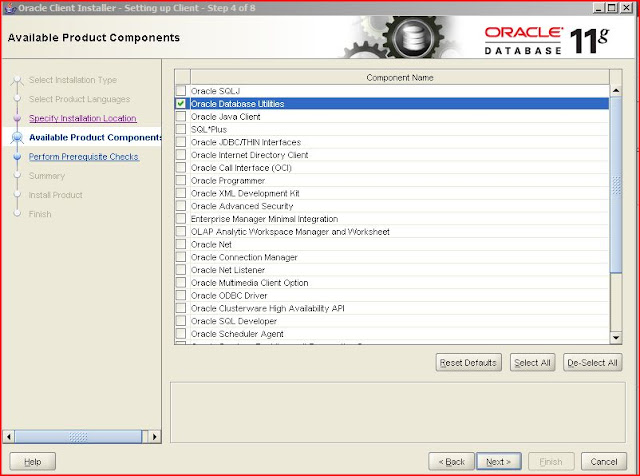
This will surely install also exp and imp export utilities.
Once installation is done, I go to C:\pierre\oradb\product\11.2.0\client_1\network\admin
and AS ADMINISTRATOR I create a tnsname.ora file with this content (be careful about spaces etc):
PIPPO_PPRD =(DESCRIPTION=(ADDRESS=(PROTOCOL=TCP)(HOST=dmhost.acme.com)(PORT=1521))(CONNECT_DATA=(SERVER=DEDICATED)(SERVICE_NAME=srv_osb)))
To test, I go to C:\pierre\oradb\product\11.2.0\client_1\bin and run:
exp help=y
the BUFFERS parameter is very important for performance
Make sure you define
PATH=C:\pierre\oradb\product\11.2.0\client_1\bin;C:\pierre\oradb\product\11.2.0\client_1\
I have also set
set TNS_ADMIN=%PATH%;C:\pierre\oradb\product\11.2.0\client_1\network\admin
but I am not sure if it's required
This command should work:
exp pp1_soainfra/pp1_peppo@PIPPO_PPRD TABLES=PIPPO_FTP SERVERS file=c:\pierre\myexport.exp log=c:\pierre\mylog.log STATISTICS=NONE
if not, check the TNSNAMES.ORA with this command:
tnsping PIPPO_PPRD
The file is win32_11gR2_client.zip.
I run install the setup ad Administrator - otherwise it fails to assess the prerequisites - and I specify as installation directory C:\pierre\oradb\product\11.2.0\client_1
I also do custom installation and choose "Oracle Database Utilities"
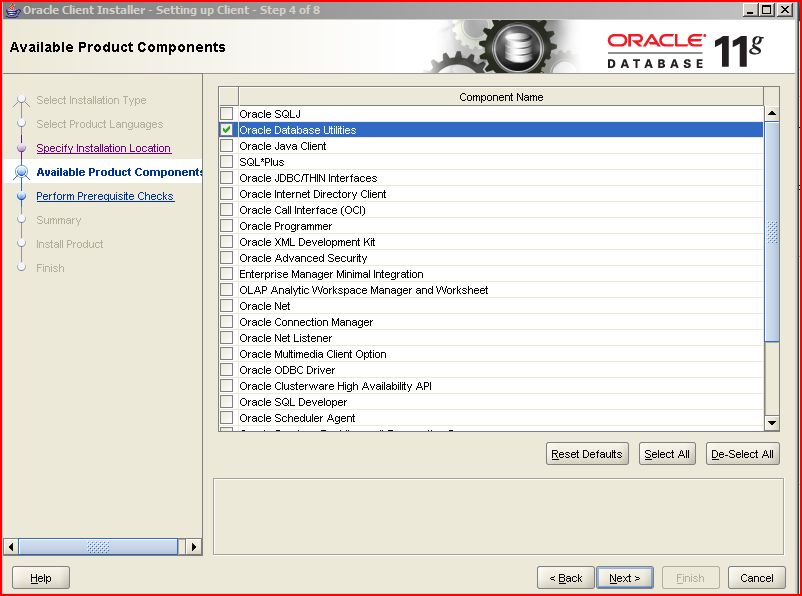
This will surely install also exp and imp export utilities.
Once installation is done, I go to C:\pierre\oradb\product\11.2.0\client_1\network\admin
and AS ADMINISTRATOR I create a tnsname.ora file with this content (be careful about spaces etc):
PIPPO_PPRD =(DESCRIPTION=(ADDRESS=(PROTOCOL=TCP)(HOST=dmhost.acme.com)(PORT=1521))(CONNECT_DATA=(SERVER=DEDICATED)(SERVICE_NAME=srv_osb)))
To test, I go to C:\pierre\oradb\product\11.2.0\client_1\bin and run:
exp help=y
the BUFFERS parameter is very important for performance
Make sure you define
PATH=C:\pierre\oradb\product\11.2.0\client_1\bin;C:\pierre\oradb\product\11.2.0\client_1\
I have also set
set TNS_ADMIN=%PATH%;C:\pierre\oradb\product\11.2.0\client_1\network\admin
but I am not sure if it's required
This command should work:
exp pp1_soainfra/pp1_peppo@PIPPO_PPRD TABLES=PIPPO_FTP SERVERS file=c:\pierre\myexport.exp log=c:\pierre\mylog.log STATISTICS=NONE
if not, check the TNSNAMES.ORA with this command:
tnsping PIPPO_PPRD
TNS Ping Utility for 32-bit Windows: Version 11.2.0.1.0 - Production on 19-DEC-2012 16:02:39

Copyright (c) 1997, 2010, Oracle.  All rights reserved.

Used parameter files:
c:\pierre\oradb\product\11.2.0\client_1\network\admin\sqlnet.ora


Used TNSNAMES adapter to resolve the alias
Attempting to contact (DESCRIPTION=(ADDRESS=(PROTOCOL=TCP)(HOST=dmhost.acme.com)(PORT=1521))(CONNECT_DATA=(SERVER=DEDICATED)(SERVICE_NAME=srv_osb)))

OK (50 msec)
Thursday, December 13, 2012
XAER_RMFAIL : Resource manager is unavailable
Could not invoke operation 'CheckMachineExist' due to:

BINDING.JCA-11812
Interaction processing error.
Error while processing the execution of the CONFIGDB.CHECKMACHINEEXISTS API interaction.
An error occurred while processing the interaction for invoking the CONFIGDB.CHECKMACHINEEXISTS API. Cause: Exception [EclipseLink-4002] (Eclipse Persistence Services - 2.1.3.v20110304-r9073): org.eclipse.persistence.exceptions.DatabaseException
Internal Exception: java.sql.SQLException: Unexpected exception while enlisting XAConnection java.sql.SQLException: XA error: XAResource.XAER_RMFAIL start() failed on resource 'PIPPO_osbpr1do': XAER_RMFAIL : Resource manager is unavailable
oracle.jdbc.xa.OracleXAException
        at oracle.jdbc.xa.OracleXAResource.checkError(OracleXAResource.java:1616)
        at oracle.jdbc.xa.client.OracleXAResource.start(OracleXAResource.java:336)
        at weblogic.jdbc.wrapper.VendorXAResource.start(VendorXAResource.java:50)
        at weblogic.jdbc.jta.DataSource.start(DataSource.java:729)
        at weblogic.transaction.internal.XAServerResourceInfo.start(XAServerResourceInfo.java:1231)
        at weblogic.transaction.internal.XAServerResourceInfo.xaStart(XAServerResourceInfo.java:1164)
        at weblogic.transaction.internal.XAServerResourceInfo.enlist(XAServerResourceInfo.java:285)
        at weblogic.transaction.internal.ServerTransactionImpl.enlistResource(ServerTransactionImpl.java:522)
        at weblogic.transaction.internal.ServerTransactionImpl.enlistResource(ServerTransactionImpl.java:449)
        at weblogic.jdbc.jta.DataSource.enlist(DataSource.java:1599)
        at weblogic.jdbc.jta.DataSource.refreshXAConnAndEnlist(DataSource.java:1503)
        at weblogic.jdbc.jta.DataSource.getConnection(DataSource.java:446)
        at weblogic.jdbc.jta.DataSource.connect(DataSource.java:403)
        at weblogic.jdbc.common.internal.RmiDataSource.getConnection(RmiDataSource.java:364)
       at org.eclipse.persistence.sessions.JNDIConnector.connect(JNDIConnector.java:126)
This might well be because your Oracle DB has hit the maximum number of processes.
select count(*) from v$process;
show parameter session
NAME                                               TYPE        VALUE
-------------------------------------------------- ----------- ----------------------------------------------------------------------------------------------------
java_max_sessionspace_size                         integer     0
java_soft_sessionspace_limit                       integer     0
license_max_sessions                               integer     0
license_sessions_warning                           integer     0
session_cached_cursors                             integer     50
session_max_open_files                             integer     10
sessions                                           integer     480
shared_server_sessions                             integer
show parameter processes
-------------------------------------------------- ----------- ----------------------------------------------------------------------------------------------------
NAME                                               TYPE        VALUE
-------------------------------------------------- ----------- ----------------------------------------------------------------------------------------------------
aq_tm_processes                                    integer     1
db_writer_processes                                integer     1
gcs_server_processes                               integer     2
global_txn_processes                               integer     1
job_queue_processes                                integer     1000
log_archive_max_processes                          integer     4
processes                                          integer     300
You can change it with
alter system set processes=300 scope=spfile;
Subscribe to:
Posts (Atom)
