Showing posts with label ssh. Show all posts

Wednesday, January 13, 2016

X11 tunneling with Tectia SSH client

https://support.ssh.com/manuals/client-user/61/client-tunnel-x11.html

Do "Edit/Tectia Connections"
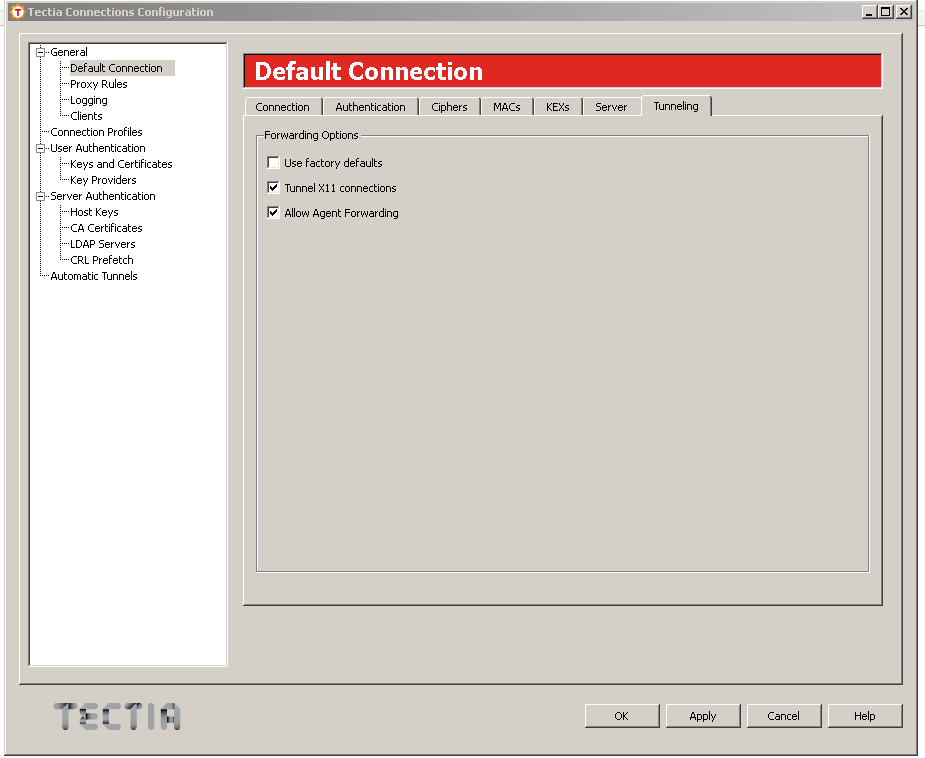


ssh-broker-config.xml is in several places, verify that all files contains this

     <server-banners visible="yes" /> 
     <forwards> 
       <forward type="x11" state="on"/> 
       <forward type="agent" state="on"/> 
     </forwards> 


the files are:

  C:\Documents and Settings\PIPPO\AppData\Roaming\SSH\
   29.09.15│  5728│AI    │ssh-broker-config.xml
  C:\Documents and Settings\PIPPO\Application Data\SSH\
   29.09.15│  5728│AI    │ssh-broker-config.xml
  C:\Users\PIPPO\AppData\Roaming\SSH\
   29.09.15│  5728│AI    │ssh-broker-config.xml
  C:\Users\PIPPO\Application Data\SSH\
   29.09.15│  5728│AI    │ssh-broker-config.xml


Tuesday, February 4, 2014

JProfiler connection through SSH Tunnel

If you don't want to open a firewall for JProfiler, here is a simple trick:
- on the monitored server, run the startManagedWebLogic_jprofiler.sh
- make sure the port 8849 is being listened to (netstat -an | grep 8849)
- open putty
- open a connection to your monitored server, using this setting for SSH tunnel:


(the obscured hostname is the FQDN of the monitored server)

you will notice that on your laptop, BEFORE the connection you have nothing on port 8849, while AFTER you have a LOCAL port open, and being forwarded to the remote host:

netstat -an | find "8849"
  TCP    127.0.0.1:8849         0.0.0.0:0              LISTENING
  TCP    [::1]:8849             [::]:0                 LISTENING

netstat -an | find "10.56.10.126"
  TCP    10.240.21.73:58756     10.56.10.126:22        ESTABLISHED
  TCP    10.240.21.73:58944     10.56.10.126:22        ESTABLISHED
  TCP    10.240.21.73:58969     10.56.10.126:22        ESTABLISHED


(10.56.80.126 is the remote IP, 10.240.21.73 is the local IP... you see several connections, one is my putty open, the others are Tunnel)

You can now open your JProfiler session, but make it point to localhost:8849, not to the remotehost:8849. It works!

Saturday, November 3, 2012

passwordless ssh, scp , expect and ssh-agent

I have a soa user on host1, and a pvernet user on host2. pvernet@host2 can sudo su - soa, and carry out soa operations on host2.

My problem is to automate all operations on host2 with scripts running on host1.

ssh requires a password to be manually entered each time (no way to pass it as parameter, don't ask me why, I find it EXTREMELY annoying... probably for security reasons, but hey give me the option and let me decide).

An alternative is using http://en.wikipedia.org/wiki/Expect :

Create a file "remotels.expect" :
spawn ssh pvernet@host2 ls /opt/oracle
expect "password:"
send "mypassword\r"

set results $expect_out(buffer)
expect eof


then run it with "expect -f remotels.expect".

When you try to embed in the .expect file a "sudo su - soa" followed by a "expect password:", then a command "touch bla.txt", the command "touch bla.txt" is still executed as "pvernet" and not as soa. No clue why. Maybe I am "expecting" a bit too much from Expect.

The alternatives are:

  •  passwordless ssh with a passwordless rsa key (pvernet on host1 -> soa on host2) https://blogs.oracle.com/jkini/entry/how_to_scp_scp_and , it's very easy to setup (remember to chmod 644 authentication_keys !!!) and works like a charm.... but anybody gaining access to "pvernet" on host1 would then be able to run any command as "soa" on host2, which is a major security breach.


  • setting up a password protected rsa key + Expect (pvernet on host1 -> soa on host2): when you run the "ssh" command you would me prompted NOT with the soa password, but with the rsa key password...let Expect provide that rsa password, and then you need not to "sudo" since you act on host2 as "soa". I still need to test this. This is the same as the .ssh/identity approach described here http://www.slac.stanford.edu/BFROOT/www/Computing/Offline/DataDist/ssh-idfile.html


  • using ssh-agent to provide the "pvernet@host2" password for you, then use Expect to "sudo su - soa" remotely... this also can be tricky, still need to test.


Of course I have no option to set sudo to NOPASSWORD in the sudoers file.


Friday, July 27, 2012

ssh Server refused our key

chmod 600 .ssh/authorized_keys

fixed the issue


don't ask me why the login process is so fussy... they should at least give you a warning or hint or something...

Saturday, July 7, 2012

ssh with password

if you want to run the "ls" command on a remote host:

expect -c 'spawn ssh myuser@acmehost ls ; expect assword ; send "mypassword\n" ; interact'


it works like a breeze!

only problem is that you are exposing your password in clear text...

Thursday, May 3, 2012

scp without password

https://blogs.oracle.com/jkini/entry/how_to_scp_scp_and

cd
ls .ssh

authorized_keys known_hosts


ssh-keygen -t rsa
Generating public/private rsa key pair.
Enter file in which to save the key (/home/pvernet/.ssh/id_rsa):
Enter passphrase (empty for no passphrase):
Enter same passphrase again:
Your identification has been saved in /home/pvernet/.ssh/id_rsa.
Your public key has been saved in /home/pvernet/.ssh/id_rsa.pub.
The key fingerprint is:
b8:73:75:3a:43:da:5c:14:42:93:d4:7d:cb:7b:4c:e3 pvernet@pippohost105


scp .ssh/id_rsa.pub pvernet@pippohost106:/home/pvernet/

login to pippohost106

mkdir .ssh
cat id_rsa.pub >> ~/.ssh/authorized_keys
chmod 700 ~/.ssh/authorized_keys
rm id_rsa.pub


See also here

Tuesday, April 24, 2012

Public Key Authentication With PuTTY

http://www.ualberta.ca/CNS/RESEARCH/LinuxClusters/pka-putty.html


I run PuTTYgen

provide passphrase
generate key

save public key ssh-rsa in a file ssh-rsa.txt
save private key to myuserpprd.ppk


I log to remote server as myuser

mkdir .ssh
cd .ssh
vi authorized_keys
paste the public key
save

chmod 600 authorized_keys*
run putty
edit the "Private key file for authentication" to provide myuserpprd.ppk

the first login I get

"Authenticating with public key "rsa-key-20120424"
Passphrase for key "rsa-key-20120424":"

Sunday, July 31, 2011

ssh connect to host port 22 connection refused

I got this message while trying to ssh into my VMWare Ubuntu 10.4:

ssh connect to host xxx port 22 connection refused

I do this:

sudo apt-get update
sudo apt-get install openssh-server

and.... it works again! cool!


I get the same message with the Oracle VirtualBox Linux: here is a suggested solution

http://www.wiredrevolution.com/virtualbox/setup-ssh-access-between-virtualbox-host-and-guest-vms

it works!

Thursday, September 10, 2009

SSH Keys don't work and I keep getting "password" request

it could be that you have assigned too much grants on a directory, for security reasons ssh will not work - and will not give you any warning...

check with a Unix guru!

Friday, June 12, 2009

SSH and keygen

good tutorial here:

http://www.virtualhelp.me/copyright/65-ssh-and-authorized-keys
and here
http://www.modwest.com/help/kb20-90.html

in a nutshell:

ssh-keygen
ssh-keygen -t dsa
cat id_rsa.pub >> authorized_keys
cat id_dsa.pub >> authorized_keys2