this post provides useful insights on how to detect issues from a Thread Dump:
http://allthingsmdw.blogspot.com/2012/02/analyzing-thread-dumps-in-middleware_08.html
For a quick thread dump consolidation one can use https://spotify.github.io/threaddump-analyzer/ or https://www.jetbrains.com/help/idea/analyzing-external-stacktraces.html (both are quite equivalent)....
Problem is that these tools are Application Server agnostic and don't tell you what is normal and what is not. I think some AI should be added to the tool, plus some graphical rendering for instance of the lock analysis.
When I have time I want to look into https://fastthread.io/
Anyway advanced thread analysis is a skill in itself and should be done with proper tooling... manually sorting stuff can be overwhelming for the regular human being.
Showing posts with label threaddump. Show all posts
Showing posts with label threaddump. Show all posts
Wednesday, April 17, 2019


Friday, June 24, 2016
Wednesday, December 16, 2015
ThreadLogic!
ThreadLogic seems to be a valuable tood for thread analysis
https://java.net/projects/threadlogic download here
https://myfmw.wordpress.com/2015/04/11/my-first-experiences-with-threadlogic/
https://zeroproductionincidents.wordpress.com/2012/07/10/threadlogic-another-thread-dump-analysis-tool/
https://java.net/projects/threadlogic download here
https://myfmw.wordpress.com/2015/04/11/my-first-experiences-with-threadlogic/
https://zeroproductionincidents.wordpress.com/2012/07/10/threadlogic-another-thread-dump-analysis-tool/
Monday, December 14, 2015
Online Java Thread Dump Analyzer
http://spotify.github.io/threaddump-analyzer/
simple and cool.... it's just what you need in 95% of the cases
simple and cool.... it's just what you need in 95% of the cases
Sunday, August 9, 2015
Sample code to test an object monitor
package com.pierre;

public class LockGeneration {
 public static Object myMonitor = new Object();

 public static void main(String[] args) throws InterruptedException {
  T1 t1 = new T1();
  T2 t2 = new T2();
  t1.start();
  t2.start();
  for (;;) {
   Thread.sleep(1000);
  }
 }

}

class T1 extends Thread {

 @Override
 public void run() {
  System.out.println("T1 started");
  super.run();
  for (;;) {
   try {
    synchronized (LockGeneration.myMonitor) {
     Thread.sleep(1030);
    }
    Thread.sleep(10);
   } catch (InterruptedException e) {
    // TODO Auto-generated catch block
    e.printStackTrace();
   }
  }
 }

}

class T2 extends Thread {

 @Override
 public void run() {
  System.out.println("T2 started");
  super.run();
  for (;;) {
   try {
    synchronized (LockGeneration.myMonitor) {
     Thread.sleep(1050);
    }
    Thread.sleep(10);
   } catch (InterruptedException e) {
    // TODO Auto-generated catch block
    e.printStackTrace();
   }
  }
 }

}
a thread dump will show for instance:
"Thread-1" prio=6 tid=0x000000001b9be000 nid=0x3c4c waiting for monitor entry [0x000000001c57f000]
   java.lang.Thread.State: BLOCKED (on object monitor)
 at com.pierre.T2.run(LockGeneration.java:48)
 - waiting to lock <0x0000000755ecf6b0> (a java.lang.Object)

   Locked ownable synchronizers:
 - None

"Thread-0" prio=6 tid=0x000000001b9bd000 nid=0x513c waiting on condition [0x000000001c47f000]
   java.lang.Thread.State: TIMED_WAITING (sleeping)
 at java.lang.Thread.sleep(Native Method)
 at com.pierre.T1.run(LockGeneration.java:27)
 - locked <0x0000000755ecf6b0> (a java.lang.Object)

   Locked ownable synchronizers:
 - None
so the thread (T1 in this case) holding the lock on the object monitor will show "locked < OBJECT ID > " (the TD shows also the TYPE of the lock, a java.lang.Object)
the thread T1 when sleeping will be in TIMED_WAITING (= wait for on a notification but with a timeout), and waiting on condition
the thread T2 waiting to acquire the lock will be in BLOCKED (on object monitor) and waiting to lock <0x0000000755ecf6b0> (which is the same OBJECT ID held by T1.
Thursday, April 11, 2013
Thread Dump Analyzer
I have installed a plugin for VisualVM to analyse Thread Dumps:
http://java.net/projects/tda/downloads/directory/visualvm
download the 3 plugins (all 3 are necessary)
it says:
https://tda.dev.java.net
Version: 2.2 Author: Ingo Rockel Date: 8/9/10 Source: net-java-dev-tda-visualvm.nbm Homepage: https://tda.dev.java.net
Plugin Description
VisualVM Module of TDA - Thread Dump Analyzer
To install the plugin
open C:\Oracle\Middleware\jdk160_24\bin\jvisualvm.exe
tools /plugins/downloaded/add plugin/install
"they are not signed" warning.... continue
Be aware that thread dump files must have extension .tdump (like: bla.tdump)
go to file/open/bla.tdump
the trick is to look for "waiting threads", click on the STUCK thread


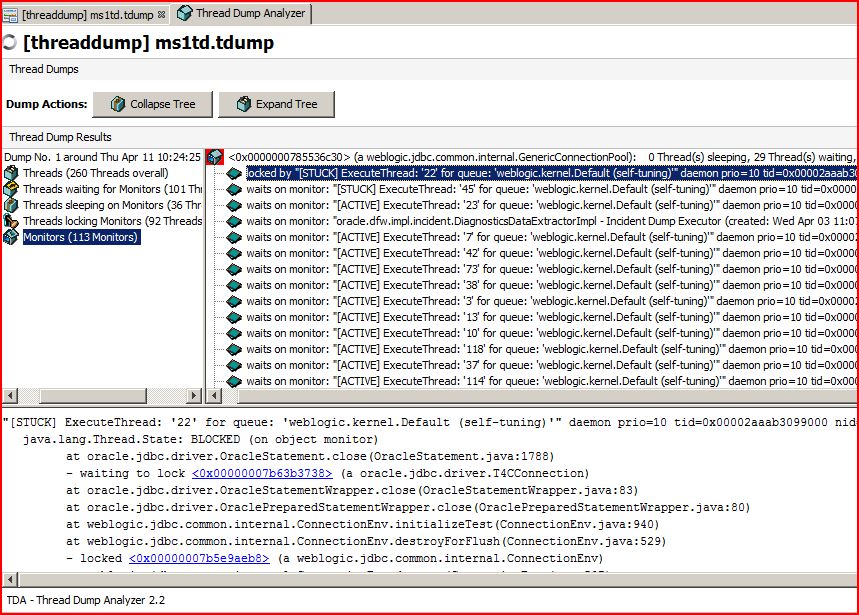
The tool makes it very easy to navigate from thread to thread based on the monitor id, so as to identify the root cause of a stuck thread.
Subscribe to:
Posts (Atom)
